







Splitting an employee's pay between departments
You can split individual pays between two or more departments. To do this, you must have two or more departments set up (under Maintain Departments), and you need tell Payroll Pro you would like to split pays between departments under "Defaults & Setup". Note that if you only wish to categorise employees in different departments, but do not want to split pays between departments, you do not need to set up as below.
 Please note that when a pay for an employee is split between two or more departments, only the gross amounts and non-IRD deductions are allocated to the different departments. The IRD deductions (PAYE, Student loan, Child support, KiwiSaver) are allocated in full to the employee's main department - i.e. these are not split.
Step 1
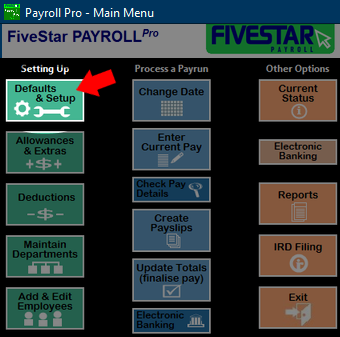
From the main menu, click Defaults & Setup.
Step 2
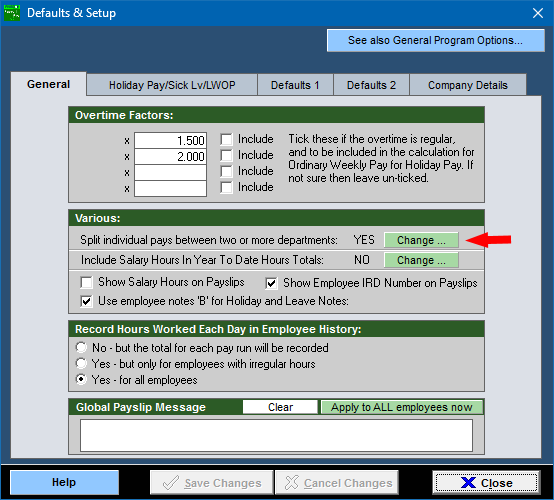
Check that the option Split individual pays between two or more departments is set to YES.
Not required for simply categorising employees in different departments, only needed for splitting a pay for a single employee between departments.
If not, click the "Change..." button.
Click "Save Changes" to return to the main menu.
Or, if the setting is already YES, just click "Close".
Step 3
To enter a different department for part of the employees pay, select Enter Current Pay, and go to the TimeSheet.
You will now see a department column. Leave the department column blank to use the employee's main department, or enter a different department code into the column. In this example the employee's main department is D001, but on Monday 20/10/2025 the employee worked in department D002. On Wednesday 22nd, the employee worked 5 hours in their main department (D001) and 3 hours in department D002.
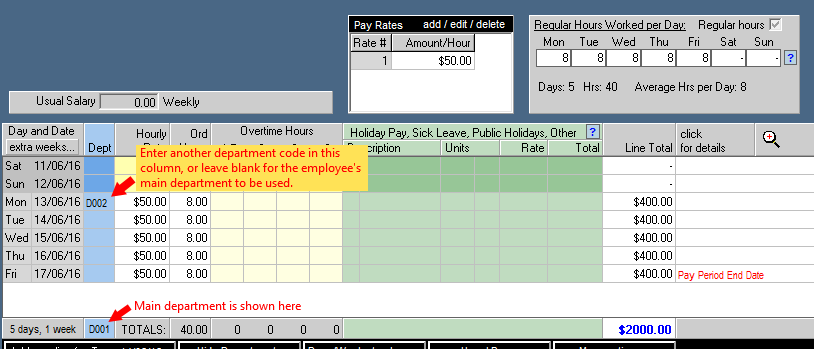
When the pay is finalised, the figures will be allocated as follows:
Department 001: 37 ordinary hours, $1850 gross pay, the total PAYE, and the total of any Student Loan repayments, KiwiSaver, and Child Support.
Department 002: 3 ordinary hours, $150 gross pay, none of the PAYE, Student Loan repayments, KiwiSaver, or Child Support.
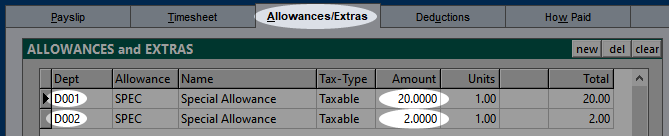
A similar allocation method is used for allowances and other deductions. In the following example, an employee is paid a $22.00 taxable allowance which is simply called "Special Allowance" in this example. $20 is allocated to the employee's main department employee (D001), and $2 to department D002. Because the employee's main department is D001, D001 did not need to be entered, so a blank department will have achieved the same effect. However, if the employee's main department was later changed to D003 and this is a recurring payment, then explicitly entering D001 means the $20 would always go to D001. Leaving the department blank means the $20 will be allocated to whatever the employee's main department is at the time.
Note 1
For the next pay, the department column will be set back to blank (to be the employee's main department) so you don't have to remember to do this yourself..
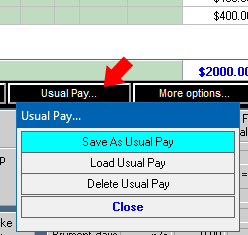
However if you would like the pay to remain the same for the next and subsequent pays (department splits and hours), you can save this pay as the "usual pay". To save as a usual pay:
Click "Usual Pay" then click "Save As Usual Pay".
Note 2
Splitting between departments assumes the departments are just departments within the same employer (so the departments are all under the same company IRD number). Separate payroll companies would be used if each department represented a different employer (i.e. different employer IRD numbers), and also an employee would be on a secondary tax code when paid under one of these other employers.
So, when a pay is split between departments, the hours and gross dollar amount are analysed out, and put into the separate department totals. This is fine since it is the gross and hours figures which are used for accounting analysis purposes.
However, the IRD deductions such as PAYE, Student Loan and Child Support are analysed to (put into) the employees main department. Due to the tax rules, there really is no one way to split PAYE etc up, so these are put into the employees main department to avoid confusion.
This will not have any affect on the totals which go to IRD with payday filing, since the figures which go to the IRD are the totals of all departments (= the company/employer total).
Note 3
The report created during the Update Totals keeps things simple by just showing each employee in own main department. Showing splits could lead to a very large report which would be difficult to read. But don't worry - the gross figures for accounting purposes can be found from both the year-to-date department report and for more detail, the department pay history report.
